
Which AI Are You Using?
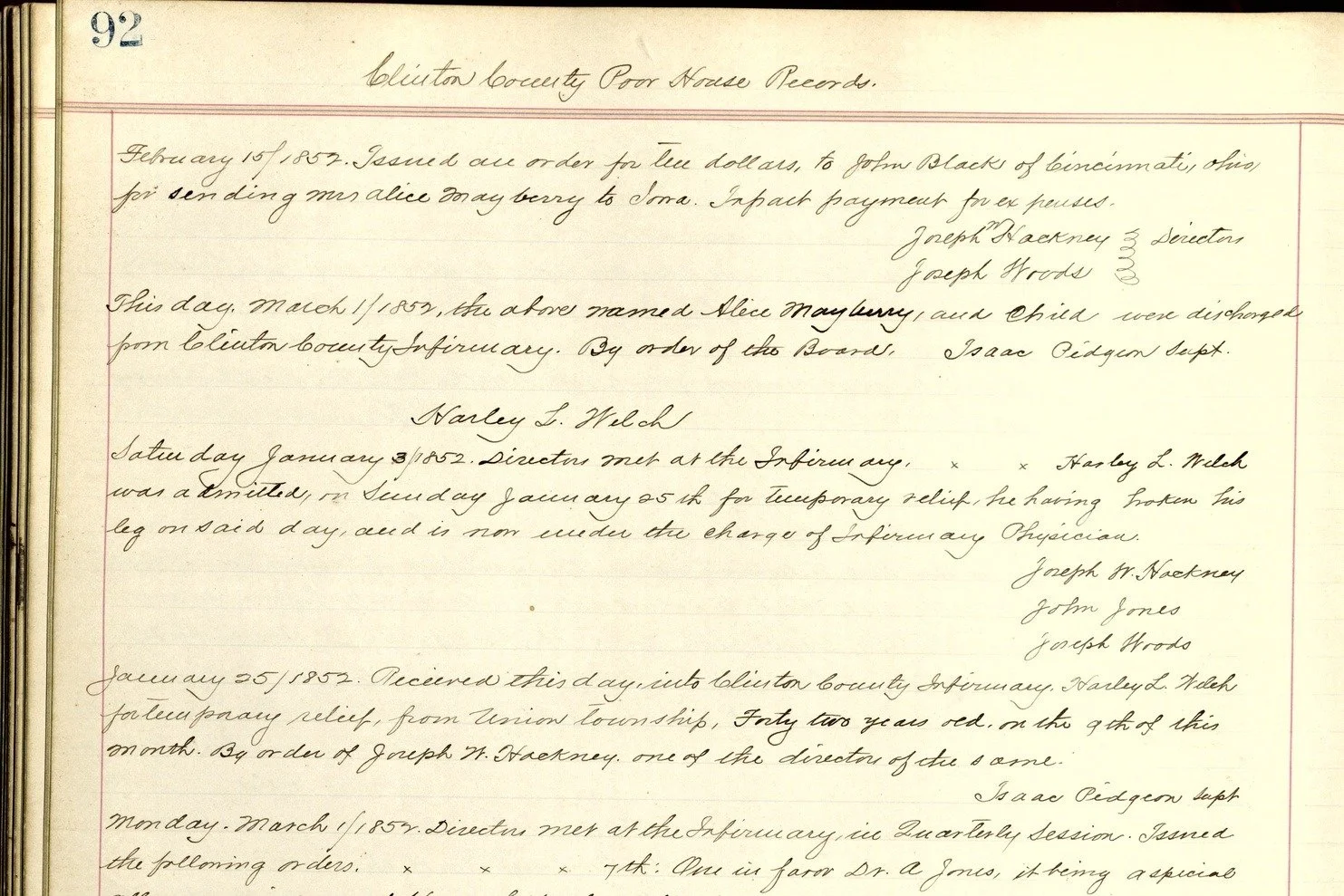
Clinton County Infirmary inmate register, County Infirmary Inmates 1835–1918, Book 1, page 92, headed “Clinton County Poor House Records”: the page used in the test. Clinton County Records & Archives.
A former schoolteacher who volunteers at the genealogical society asked me a question I still cannot answer in one sentence.
“Which AI are you using?”
I hear it almost everywhere I go now. People in their twenties ask it. People in their nineties ask it. They want the name of a company, and they want to know what I use it for. My answer always starts the same way: it depends. That is not a dodge. Every job is different, and so is every tool.
This is the long version of that answer. You do not need a technical background to follow it. If you have a free AI app on your phone, you can run the same kind of test I describe here.
One Page, Six Tools
In December 2025 I ran a simple test. I took one page from the Clinton County Infirmary’s record book, here in southwest Ohio. Its entries run from 1852 to 1900, and the handwriting is about as clean as old handwriting gets. My own reading of the page, word by word, became the answer key.
I gave that page to six AI tools and asked each one to transcribe it. Four were familiar chat apps, the kind most people carry on a phone. One was a “studio” website that a model maker runs so developers can try its newest model. One was a transcription program built for historical documents, connected to a model through a developer account.
Then I scored each result against my answer key by counting the characters that would have to be fixed to make it match. I ignored capitalization and punctuation, so no tool lost points over a comma.
The two best results had about 1.5 to 1.7 percent of their characters wrong. The four chat apps had roughly 10 to 15 percent wrong. On a page of about 375 words, that is the difference between a few dozen wrong characters and two or three hundred.
Here is what those numbers look like on the page. It opens with a date: February 15, 1852. All four chat apps got that date wrong, and no two of them got it wrong the same way. Both of the top scorers read it correctly.
That first entry records a ten-dollar payment for sending a Mrs. Alice Mayberry to Iowa. One chat app read those words as “for making one Alice Macy’s coffin.” It gave a living woman a new name and a coffin, and it did so in a clean, confident sentence. A few lines down, the same page records that she and her child were discharged from the Infirmary on March 1. The app transcribed that line too. It never flagged the contradiction.
and a coffin.
Had I trusted that reading, I would have gone hunting for a death that is not in the record.
One caution before I go further. One page is one page. The companies have released newer models since I ran that test, and the ranking I got is already out of date. I am not printing a scoreboard, because it would mislead you by the time you read it. The method is what lasts.
The Name on the Box
The most useful thing that test taught me had nothing to do with which company won. One company’s AI landed in both groups. Through its everyday chat app, it finished back in the pack. Reached a different way, it finished at the top.
So “which AI” is really three questions. Which company? Which of its models? And which door are you using to reach it?
Most people I talk with are using a free version on a phone or tablet. Those who pay are usually on the lowest-priced plan. Few realize how much changes from one tier to the next: which model answers you, how much you can use it, and which features are switched on.
There is also a door most people never see. The companies sell access to people who build software. A developer account pays for what it uses instead of a flat monthly fee, and other programs can connect straight to the model. On my test page, a transcription program connected that way beat the same company’s own chat app by a wide margin.
Why the gap? One page cannot tell me. Chat apps do not always tell you which model is answering, and the transcription program brings its own built-in instructions. What I can say is that the brand name told me less than the specific product behind it.
Cloud or Desktop
There is one more split worth knowing. A chat app is a cloud service. It runs on the company’s computers, and it works only with what you type or upload.
A desktop version is a program installed on my own computer. With my permission, it can work inside my folders. It can read a batch of scanned pages, build a spreadsheet, and keep a log of what it did. The thinking still happens on the company’s computers, so I stay careful about what I let it read. But I can watch each step as it happens, and approve it or stop it.
The newest piece is remote control. I can start a long job at my desk, walk away, and check on it from my phone, answering its questions and approving steps as I go. That is the feature that surprises people most.
The more I learned, the less I used the casual chat apps for real work. I moved to task-focused tools that let me set up several projects at once and see what the AI is doing in real time. It is like having a team of employees. I oversee the work, direct it, give the approvals, and review the final output for corrections.
The Thinking Dial
Many of these tools now let you choose how hard the model thinks before it answers. More thinking is slower, and it uses up more of your plan’s allowance. Every plan has a limit.
I turn the dial up when there is a lot of evidence to review or manage, or when several tasks have to run at once. For my book project I have often run the most capable model at full strength. For lighter work I dial it back, and I compare models at the same setting to see which one does the job for less.
Right now I am on a top-tier plan, because my first year in business has been a heavy one. AI has helped me set up my bookkeeping, develop and manage a newspaper series, and keep a book moving while I worked client cases. I could not have done all of that alone. I expect to step down a tier once the workload settles.
When I opened the firm, I put it this way: “AI handles the volume. I focus on the evidence that actually matters.” That still holds.
Match the Tool to the Job
Each model has its strengths and its weaknesses. The hardest part is lining up the work with the right tool. These are the kinds of jobs I hand to AI:
- Reading old handwriting.
- Locating sources inside large sets of records.
- Organizing and checking big sets of evidence.
- Tightening and proofreading written work.
- Design and layout.
No single tool is best at all five. The company whose tools I lean on most to manage long projects was not the best reader of old handwriting on my test page.
What Every One of Them Gets Wrong
Names, dates and numbers. Those are the facts a family historian cares about most, and they are exactly where these tools slip. On my test page the misreadings included a date, a woman’s name, a place, and the names of the men who ran the Infirmary.
Even my two best scorers were not clean. One read “Iowa” as “Sma” and moved a date by six days. The other dropped the year from three entries.
The worst errors do not look like errors. They read smoothly. A coffin is a believable thing to see in an infirmary’s books. That is why I treat every AI transcription as a draft, and read it against the original image before I rely on a word of it.
Mark Humphries, a history professor who tests these tools on old records, has published a simple idea worth borrowing. When two different AI models disagree about a word, he writes, “at least one of them must be wrong.” He reports that putting those disagreements in front of a human reader catches about three-quarters of the errors.
Before You Pick One
When the former schoolteacher asked, I said it depends. Here is the longer answer I give now, whichever AI you use.
- Start with the job, not the brand. Decide what you need done, then look for the tool that does that one thing well.
- Know which version you are on. Free, paid and top-tier plans are not the same tool. Neither are the phone app and the developer door.
- Give it a well-structured request. Say what the document is and exactly what you want back.
- Set guardrails and a scope. Tell it what it may and may not do, tell it to mark what it cannot read instead of guessing, and keep each task small enough to check.
- Run your own one-page test. Pick a page you have already read yourself. Give it to each tool you are considering. Check the names, dates and numbers first.
- Double-check everything. An AI’s reading is a lead. It becomes evidence only after you have compared it with the original.
So, which AI am I using? The one that fits the job in front of me. And never without checking the record myself.
Sources: Clinton County Infirmary inmate register, County Infirmary Inmates 1835–1918, Book 1, p. 92, headed “Clinton County Poor House Records” (Clinton County Records & Archives). The author’s transcription comparison, December 5–7, 2025: one page, six tools, each scored against the author’s own reading. Mark Humphries, “When Models Disagree...Transcription Accuracy Improves Significantly,” Generative History, May 27, 2026. Buckeye Genealogy & Research, LLC, “250 Lost Graves: Clinton County Researcher Opens New Firm,” press release, May 20, 2026.

